


Serial Cloner also lets you build text restriction map and quickly format it to add multi-frame translation or only show single cutters for example. Since version 2.1, Sequence Features are visible in the Sequence Map.
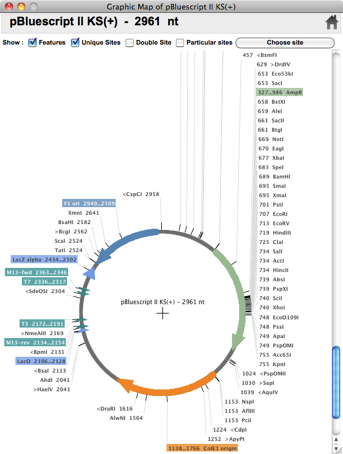
The graphic map of Serial Cloner is really Graphic as you can easily select and extract a fragment or show single, double or multiple cutter all in the same window. All the features are displayed on the map using user-modifiable colors; the features can be manually entered, imported from GenBank or automatically found after scanning by Serial Cloner. The Collection of Features to be scanned for can be defined and modified by the user, imported and exported.
Version 2.5 now allows to open protein sequences, align protein sequences and reverse translate proteins using defined codon biais tables.
Virtual PCR
Adaptor Synthesis
Ligate Fragments
Main Functions
Extract Fragments
Don’t clone alone


shRNA Set-Up


Fully Graphical Map
Sequence Window
Gateway(tm) cloning
Serial Cloner has been developed to provide a light yet powerful molecular biology software to both Macintosh and Windows users. A Linux version is also distributed. Serial Cloner reads and write DNA Strider-compatible files and import and export files in the universal FASTA format. Serial Cloner also import files saved in the Vector NTI, MacVector, ApE, DNAstar, pDRAW32 and GenBank formats. Import from VectorNTI multi-file format is also supported. Powerful graphical display tools and simple interfaces help the analysis and construction steps in a very intuitive way. Serial Cloner 2.5, handles Annotations and Features both in the sequence and in the Graphic Map and can automatically scan for sequence Features.
Overview
An intuitive Interface
Serial Cloner will assist you in setting-up new sub-cloning projects and in preparing the electronic versions of your constructs.



Clone in a Few Clicks


Sequence Alignment
Sequence Map


Web Access
Virtual Cutter


-
What's new in Serial Cloner 2.6
-
(see the available contextual help window to get more details on new functions)
-
-
2.6.1
-
- [ADDED] a preference to limit or not the width of Seq & Prot windows
-
- [CORRECTED] Detection of overlapping Primers in PCR
-
- [CORRECTED] Bug in "show info" toggle under Windows and Linux
-
- [CORRECTED] Slow down under certain Windows install due to autosaving
-
- [CORRECTED] Error in definition of PreScission site
-
- [CORRECTED] Save/Save As problem is PCR window
-
- [CORRECTED] Insertion point position when editing a protein sequence
-
-
2.6.0
-
- [NEW] Estimates Isoelectric point of protein sequences (DNA and Protein Sequence Window)
-
- [NEW] MacOSX version now distributed as a signed application (Mountain Lion Gatekeeper compatibility)
-
- [ADDED] An option in the Preferences to select pK value tables to use for pI estimation
-
- [ADDED] An option in the Preferences to use the Codon code from Codon Usage tables as a Genetic code used for translation
-
- [ADDED] An option in the Restriction Map window to only translate nucleotides that are in uppercase
-
- [ADDED] A button/menu to choose particular sites to be displayed in Restriction maps.
-
- [ADDED] Scan for peptide Features in Protein Sequences
-
- [ADDED] Inherit Features when reverse-translating a DNA sequence
-
- [ADDED] A rapid switch between a DNA and Protein Align window
-
- [ADDED] Non formatted copy of Protein sequence (Copy More… Menu)
-
- [ADDED] Inherit Features when copying/Pasting Protein sequences
-
- [ADDED] Display Features in Protein Align (Local Align)
-
- [ADDED] A toggle button to highlight differences in aligned proteins
-
- [ADDED] A shortcut (S) to quickly show or mask Features (in the Features tab of Sequence Windows)
-
- [ADDED] 'Anchor' and 'Core' domains of Primers are now recognized as Features in Sequence Windows
-
- [ADDED] A button to quickly select a full linear insert in the 'Build a Construct' window
-
- [ADDED] Added a shortcut to 'Copy Non Formatted' [COMMAND-SHIFT-K]
-
- [ADDED] A menu entry to go to Serial Cloner Forum
-
- [ADDED] A menu entry to go to Serial Cloner Youtube Channel (tutorial)
-
- [UPDATED] It is now possible to fully resize Sequence windows
-
- [UPDATED] Absent sites are indicated in italic in enzyme chooser windows (Graphic and Restriction Maps)
-
- [UPDATED] Unique sites are indicated in bold in enzyme chooser windows (Graphic and Restriction Maps)
-
- [UPDATED] Parsing of NCBI sequences (Web Access) to take in account changes in NCBI pages.
-
- [UPDATED] Improved parsing of sequences containing 'X' in the nucleotide sequence
-
- [UPDATED] Changed shortcut of 'Copy All Sequences To Multifasta' to [COMMAND-SHIFT-J] instead of [COMMAND-SHIFT-K]
-
- [CORRECTED] A Windows-specific interface bug the the 'Import Codon Bias' window
-
- [CORRECTED] A bug sometimes preventing proper copy of images (Graphic map, Virtual Cut, shRNA) in the clipboard (Windows specific)
-
- [CORRECTED] A problem arising with uncommon RE names like R1.BceSIV in the particular enzyme" chooser of the Graphic Map.
-
- [CORRECTED] A problem [Gateway Cloning] with Features indication when the destination vector was antisense (att2-att1 direction)
-
- [CORRECTED] A bug in the selection of the most used AA when reverse translating
-
- [CORRECTED] A problem with "Select All" in Sequence and Protein windows
-
- [CORRECTED] A File type problem associated to Serial Cloner files (breaking compatibility with Sequencher import in particular)
-
- [CORRECTED] Ligation : Sometimes unnecessarily produced degenerate DNA
-
- [CORRECTED] Gateway : generated DNA but then when then saved as unknown type
-
- [CORRECTED] PCR : if done on "unknown format" sequence, incorrectly generated "Protein" type.
-
- [CORRECTED] A problem updating Feature when undoing a modification
-
- [CORRECTED] When pasting a protein sequence in GenBank format (NCBI) a protein sequence window is now correctly created.
-
- [CORRECTED] A problem with the NCBI BLAST server when using non-ASCII characters in Sequence names
-
- [CORRECTED] A problem with Feature display after a scan when only one Feature was found
-
- [CORRECTED] A rare problem of Feature display in the Construct Window
-
- [CORRECTED] A refresh problem when using character size different from 12 pt in Graphic maps.
-
- [CORRECTED] A bug in the Restriction map windows where the first line of amino acid translation was shifted in codon mode
-
- [CORRECTED] A bug related preventing the use of previously selected enzymes in the Virtual Cutter Window
updated March 2012

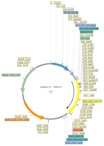
Multi-Format import
Scan for Features

pDRAW32, ApE, Fasta, GenBank, MacVector, Vector NTI, DNA Strider, Text


Molecular Biology DNA cloning plasmid software vector restriction enzyme ligase electrophoresis vector bacteria antibiotics vectorNTI APE pDRAW32 Invitrogen Biolabs Sigma genious dnastar genbank clustal EMBL
Thanks to Michael Goodson, Philippe Benaroch, Helen Schreiner, Heiko Flammann, Cariappa Annaiah, Tatiana Nedvetskaya, Leopoldo Palma, Jolita Seckute, ATSbio, Benjamin Dickins, Juliette Azimzadeh, Paris Margaritis, Javier Irazoqui, Hideshi Yagi, Miles Pufall and Jing Liang for their early support
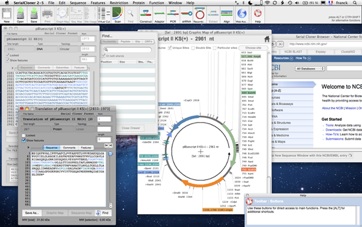

Serial Cloner is a Molecular Biology software.
It provides tools with an intuitive interface that assists you in DNA cloning, sequence analysis and visualization.
Serial Cloner is freeware
and is available for MacOSX, Windows and Linux


